
Information how to Ungroup model you can Find HERE.
1
Download NexoRestocking file from Vault
2
Put Downloaded file to your Game at Roblox Studio
Go to the Downloads folder, select the NexoRestocking.rbxm file and press Ctrl+C, then go to Roblox Studio and press Ctrl+V. Then, enable HTTP Requests in the Game Settings—this is important for it to work - Tutorial HERE.
3
Select NexoRestocking | UNGROUPME and click CTRL+U
Select NexoSessions | UNGROUP ME and click CTRL+U and then remove “DELETEME” model.
4
Ungroup all the models
Ungroup the given models at the location specified in the model’s name—for example, ServerStorage.
5
Go to Workspace > NexoPOS | NexoRestocking > Settings
6
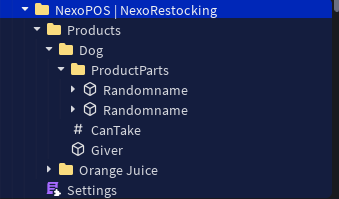
Insert Part, Model, Union anything but Tool into NexoPOS | NexoRestocking > Products > createfolderwiththesamenamewhathavetoolatserverstorage
7
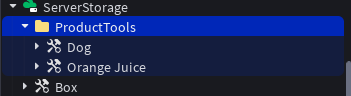
Add the "Unanchored Product" tool to ServerStorage > ProductTools. The name of the folder within the "Products" folder in the Workspace must match the name of the tool.
8
Done - Now you can use NexoRestocking Product!